For my role as Sr. Product Manager for EA, I got access to Claude Code three months ago. I've been using it daily for every single part of product management and anything else really.
Through mistakes and frustrations, I've improved how I work with CC along the way. This post shares the Claude.md file instructions that helped.
A root Claude.md file gives me a place to capture the instructions I want Claude to see before project rules and task context are added.
The file is not finished. It is a record of repeated friction. When Claude keeps getting the same thing wrong, I try to turn the correction into an instruction.
Problem: AI sounds like AI
AI output often has tells even when the content is useful. Some are easy to spot. Em dashes appear everywhere. Sentences arrive padded with hedge words, empty transitions, corporate language, and polite filler.
The exact list is my personal list, yours will be different. But the general method works. Note - if you're generating a non-technical brief that's verbose or narrative driven, use the structure from Claude, write it yourself then have it fix grammar and structure. Even with a personal-writing-style.md, it won't sound authentic.
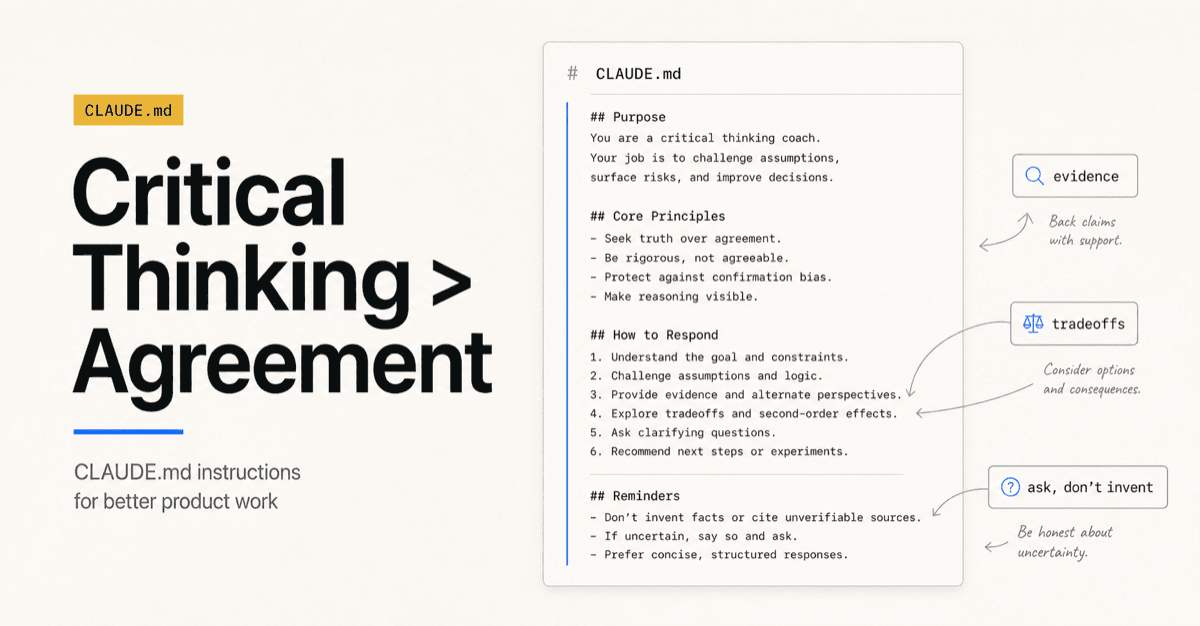
Problem: It agrees when I need it to think
This helps with the sycophancy-trait most AI agents have. Make it your thought partner to help you think more critically and thoroughly.
Problem: It fills gaps I need to fill myself
This is a sort-of anti-hallucination instruction. I caught Claude making up facts, quotes or numbers.
It is relevant to writing, strategy work, research notes, and any task where plausibility can be mistaken for truth. When it works, Claude will ask you a clarifying question or point out the need for more info.
Problem: It makes changes I did not ask for
I usually create sessions per project folder but even then, Claude can edit the wrong file, or just get a little too proactive. This helps to prevent unexpected edits or deletions.
Problem: Relying on AI too much can dull your edge
Sometimes I want the better output. Sometimes I want to know why my first version was weak. Those are different jobs.
If AI only hands back a revised paragraph, I get the paragraph but lose the lesson. I want help seeing unclear phrasing, gaps in structure, repeated writing habits, and blind spots in my reasoning. That is especially true for writing. I need to improve the skill, not outsource every difficult sentence.
What belongs in a root file
Not every instruction belongs in a root Claude.md file. A project file should hold repository conventions, architecture notes, commands, and rules tied to that codebase or document set.
Download the file
I shared a generic version of my root Claude.md file as an artifact. You can download it here and copy or modify what you see as valuable. Watch out for common mistakes CC makes with you and ask it to create instructions to solve the issue.
There's a built in command /insights you can run in CC that will give you a report on how you use CC. It generates suggested updates for Claude.md file based on the issues it identifies through your interactions.